-
×InformationNeed Windows 11 help?Check documents on compatibility, FAQs, upgrade information and available fixes.
Windows 11 Support Center. -

-
×InformationNeed Windows 11 help?Check documents on compatibility, FAQs, upgrade information and available fixes.
Windows 11 Support Center. -
- HP Community
- Printers
- Scanning, Faxing, and Copying
- Re: Scanner says the username or password is incorrect. I’m ...

Create an account on the HP Community to personalize your profile and ask a question
02-17-2021 11:58 AM
I’ve gone over every thing I can with the touch screen on the 8620. This has worked fine for over a year until now. Thanks in advance!
Solved! Go to Solution.
Accepted Solutions
02-17-2021 01:09 PM
==============================================================
Welcome to the HP Community.
Reminder to those reading:
Do NOT respond to individuals who post phone numbers or email addresses.
These might be scammers trying to steal your information / money.
HP does not post phone numbers or email in Community messages.
==============================================================
This printer supports digital send.
Use the Embedded Web Server (EWS) to check / update / test your Scan to Email profiles.
Reference
Page 16
If your email supports Two-Step verification,
The printer does not support this feature.
Log into your email provider
Set the Security settings:
If using Two-Step verification, be sure to set / use the Apps Password
If not using Two-Step verification, set "Less Secure" (See NOTE)
NOTE:: Your email provider might shut off "Less Secure" if it is not being used. Log in and check - if necessary, re-enable the option.
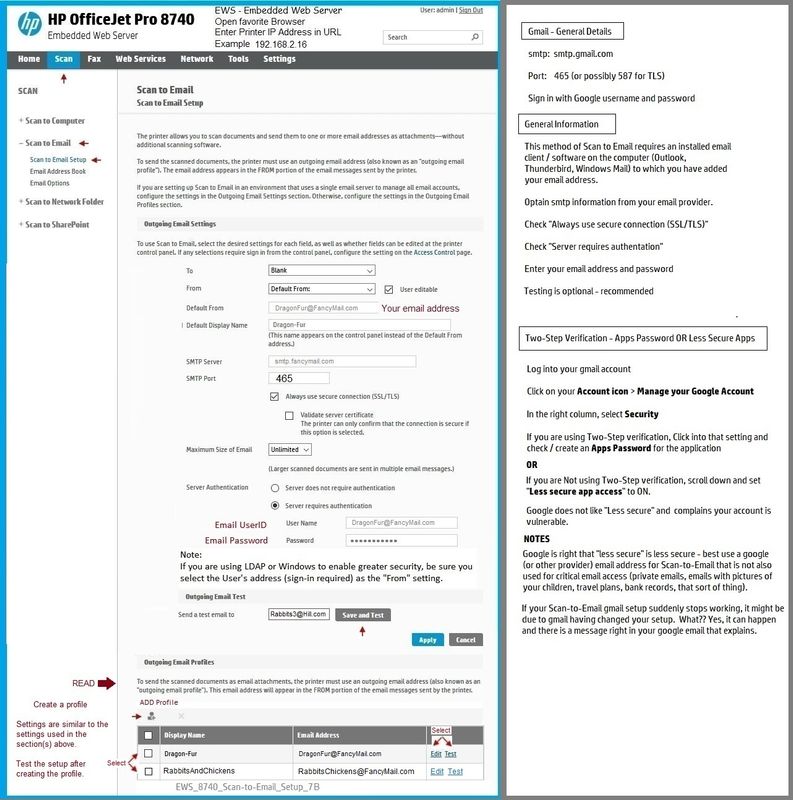
Example - EWS > Scan > Scan to Email
EWS_8740_Scan-to-Email_Setup_7B
Printer Home Page - References and Resources – Learn about your Printer - Solve Problems
“Things that are your printer”
NOTE: Content depends on device type and Operating System
Categories: Alerts, Access to the Print and Scan Doctor (Windows), Warranty Check, HP Drivers / Software / Firmware Updates, How-to Videos, Bulletins/Notices, Lots of How-to Documents, Troubleshooting, Manuals > User Guides, Product Information (Specifications), more
When the website support page opens, Select (as available) a Category > Topic > Subtopic
HP Officejet Pro 8620 e-All-in-One Printer series
Thank you for participating in the HP Community.
The Community is a separate wing of the HP website - We are not an HP business group.
Our Community is comprised of volunteers - people who own and use HP devices.
Click Thumbs Up to say Thank You.
Question Resolved / Answered, Click "Accept as Solution"
02-17-2021 01:09 PM
==============================================================
Welcome to the HP Community.
Reminder to those reading:
Do NOT respond to individuals who post phone numbers or email addresses.
These might be scammers trying to steal your information / money.
HP does not post phone numbers or email in Community messages.
==============================================================
This printer supports digital send.
Use the Embedded Web Server (EWS) to check / update / test your Scan to Email profiles.
Reference
Page 16
If your email supports Two-Step verification,
The printer does not support this feature.
Log into your email provider
Set the Security settings:
If using Two-Step verification, be sure to set / use the Apps Password
If not using Two-Step verification, set "Less Secure" (See NOTE)
NOTE:: Your email provider might shut off "Less Secure" if it is not being used. Log in and check - if necessary, re-enable the option.
Example - EWS > Scan > Scan to Email
EWS_8740_Scan-to-Email_Setup_7B
Printer Home Page - References and Resources – Learn about your Printer - Solve Problems
“Things that are your printer”
NOTE: Content depends on device type and Operating System
Categories: Alerts, Access to the Print and Scan Doctor (Windows), Warranty Check, HP Drivers / Software / Firmware Updates, How-to Videos, Bulletins/Notices, Lots of How-to Documents, Troubleshooting, Manuals > User Guides, Product Information (Specifications), more
When the website support page opens, Select (as available) a Category > Topic > Subtopic
HP Officejet Pro 8620 e-All-in-One Printer series
Thank you for participating in the HP Community.
The Community is a separate wing of the HP website - We are not an HP business group.
Our Community is comprised of volunteers - people who own and use HP devices.
Click Thumbs Up to say Thank You.
Question Resolved / Answered, Click "Accept as Solution"