Here is the solution for Blue screen error 83C0000B on HP OfficeJet Pro 8010e, 9020e Printer Series: Click here to view.
Create an account on the HP Community to personalize your profile and ask a question
Your account also allows you to connect with HP support faster, access a personal dashboard to manage all of your devices in one place, view warranty information, case status and more.
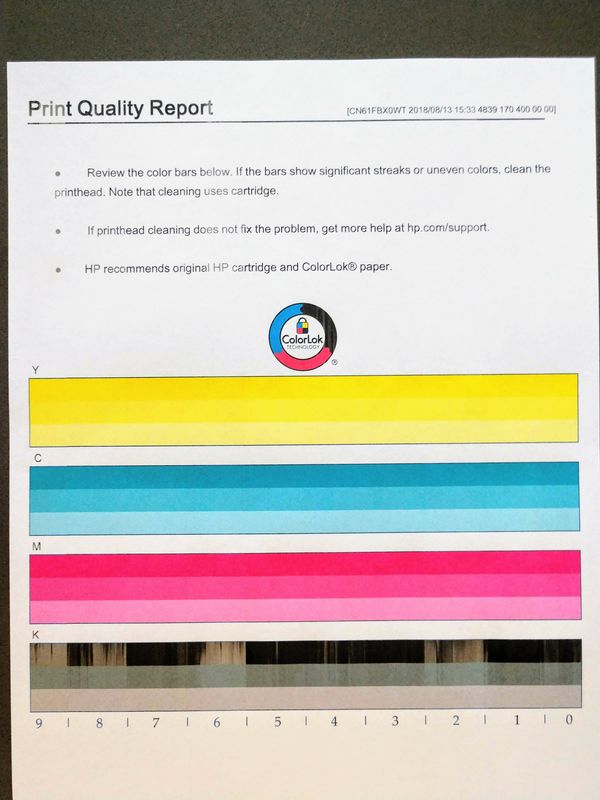
Help! I continuously have missing or light black printing on my Pagewide Pro 477dw. A sample is attached. Notice the light black printing primarily in sections 9, 8, 6, and 2.
The printer has a low print count.
I'm using genuine, non-expired cartridges.
I'm using multiple types of paper with the same result.Missing black printing
I've aligned the print heads.
I've peformed both Level 1 and Level 2 printhead cleaning, including with the special foam sheet.
Cleaning the printhead and performing an alignment WILL correct the problem for about a week only for it to return exactly the same a week later. The printer is just out of warranty and I'm fit to be tied. This is with multiple cartridges, paper, etc. The printer is never turned off so it's not a shut-down improperly issue.