Sorry, there was an error with your nomination, please try again.
Required fields can't be empty, please try again.
Create an account on the HP Community to personalize your profile and ask a question
Your account also allows you to connect with HP support faster, access a personal dashboard to manage all of your devices in one place, view warranty information, case status and more.
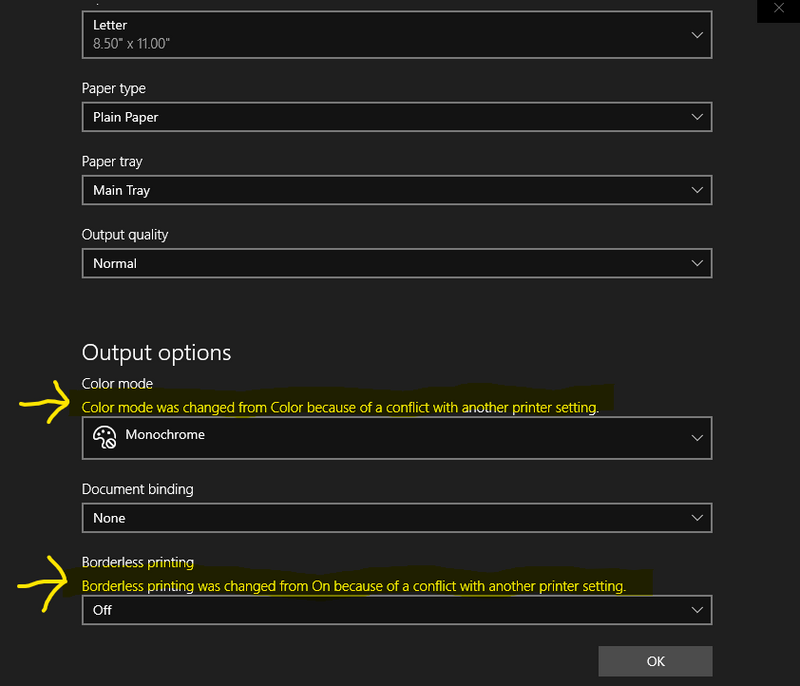
Hello. I am having a problem printing in color. My printer is an HP Envy 4520, OS is Windows 10 Pro Version 1909 and it is up to date according to windows update. The error message I get says "color mode was changed from color because of a conflict with another printer setting". It shows the same error for borderless printing as well. I have a wireless connection to the printer but have tried it with a wired connection which did not help. No recently installed programs or changes to PC settings have been made in the time when this first became a problem, which was about a week ago. Also, this is the only printer I have, so there are no others installed on this PC.
Every time I change the color mode to color and hit OK, it changes it back to monochrome and gives the error message as seen above. Both the ink cartridges and fairly new and I have aligned the cartridges. I found a thread with a similar issue and tried everything that is suggested in that thread. Here is a link to it https://h30434.www3.hp.com/t5/Inkjet-Printing/Printer-changes-back-to-monochrome-and-won-t-print-in-...
As suggested in the linked thread, I tried uninstalling the printer and drivers then reinstalling them with the latest full feature drivers downloaded directly from the HP support website. This indeed DOES fix the problem and I CAN print in color after doing so. However, it fixes the problem only temporarily as the next time I try to print something in color, it wants to print in black and white and will not allow me to change the setting to color.
So, the only way for me to get it to print in color is to uninstall and reinstall the printer/drivers. That is a real pain in the butt to have to do every time I want to print in color. How can I fix this problem so that it doesn't keep happening? What is the setting that it is conflicting with? I don't want to have to reinstall the drivers every time I want to print in color. The printer has printed in color just fine since I got it about 2 years ago and it's obviously a driver issue or unknown setting that is causing the conflict, I just don't know what to do about it.
It's worth noting my PC has both windows 7 ultimate and windows 10 pro installed on it and I don't have the issue in windows 7. However, I don't often boot to windows 7. I only use it because I have a couple of older programs that I sometimes use that won't run on windows 10, even with the compatibility settings changed. Windows 10 is my primary OS so I'd like to be able to print in color from windows 10.
Any help in resolving the issue is greatly appreciated, thanks in advance