Webcam Not Working? Advanced Fixes for HP Notebooks! Click here to view the instructions!
Create an account on the HP Community to personalize your profile and ask a question
Your account also allows you to connect with HP support faster, access a personal dashboard to manage all of your devices in one place, view warranty information, case status and more.
We would like to share some of the most frequently asked questions about: Battery Reports, Hold a charge, Test and Calibrating Battery . Check out this link: Is your notebook plugged in and not charging?
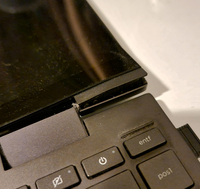
I've been having a bunch of different problems with my HP ENVY x360 13-ay and started considering to send it in, but yesterday evening when closing the lid the closing mechanism hung itself up or something like that and it started to pop out the lower right part of the display. It still works fine and without issues, but I'm afraid that closing the lid will cause a crack. I have gently tried to push it back in but there's quite the resistance and also here I'm afraid it'll break if I apply force.
Besides that I also had a whole host of other issues, namely:
- USB C Port somewhat frequently doesn't work (monitor doesn't get recognized, USB-C hub and screen works fine with other laptops) - keyboard, track-pad or both sometimes don't register anything at all (restart required) - severe overheating during normal usage because the fans don't turn on; usually requires restart (just the other day laptop black-screened because the fans didn't turn on) - Bluetooth module sometimes seizes to work (windows doesn't detect it at all; requires restart of laptop) - occasionally the laptop just is off when I haven't used it for a few minutes ("secretly" shuts down) - sometimes it then doesn't start up when pressing power button (keyboard LEDs turn on, but neither screen nor fans do; when closing lid the LEDs remain on; hard-shutdown necessary to restart laptop) - rubber-strips have fallen off, which makes it super slippery
- the official HP Pen for this device doesn't work well with the screen (prior to the screen popping out) - sometimes it burns through all of it's energy quite quickly when not plugged in, even when the lid is closed, causing it to be drained and hot
I'm not sure what to do. Will this be covered by the extended warranty?
If so, should I just send-in the laptop stretched out, rather than with a closed lid? I don't want the repair team to tell me I've dropped and cracked the screen, when it just broke itself when closing the lid.