-
×InformationNeed Windows 11 help?Check documents on compatibility, FAQs, upgrade information and available fixes.
Windows 11 Support Center. -

-
×InformationNeed Windows 11 help?Check documents on compatibility, FAQs, upgrade information and available fixes.
Windows 11 Support Center. -
- HP Community
- Printers
- Printer Ink Cartridges & Print Quality
- Re: Deskjet 4535 incompactable catridge

Create an account on the HP Community to personalize your profile and ask a question
06-26-2021 11:49 PM
Anybody can help to resolve the issue? For the printer hp 652 catridge is using. For the availablity of catridge i have purchased hp680 catridge it is showing incompactable how to fix this issue?
Solved! Go to Solution.
Accepted Solutions
06-30-2021 08:00 AM
We need to perform a regional reset on the printer to resolve this issue.
The reset instructions are specific for your printer and performing those steps on a different printer may brick the device.
I've sent you a private message with reset instructions, follow the reset instruction to perform a full reset and re-initialize the printer.
In order to access your private messages, click the private message icon on the upper right corner of your HP Community profile, next to your profile Name or simply click on this link.
Keep me posted.
Sandytechy20
I am an HP Employee
06-30-2021 06:36 AM
Welcome to the HP support community.
Did you shift the printer to a different region?
Meanwhile:-
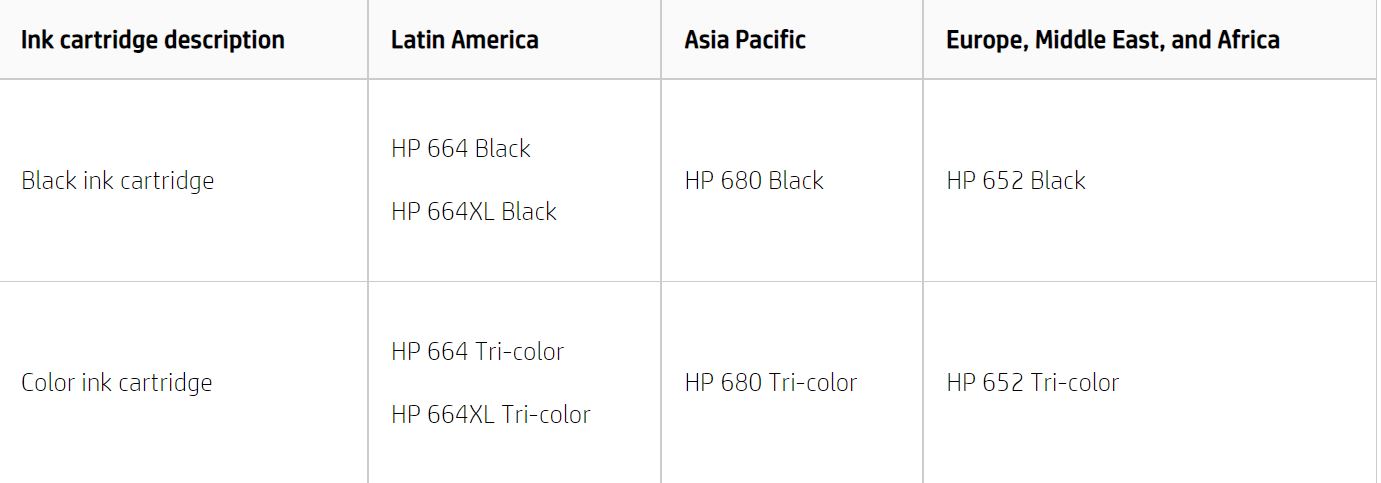
Here is the list of the cartridges which can be used in your region:-
Refer to this printer specifications for more assistance:- Click here
Let me know how it goes.
To thank me for my efforts to help you, please mark my post as an accepted solution so that it benefits several others.
Cheers.
Sandytechy20
I am an HP Employee
06-30-2021 07:14 AM
The printer was purchased from abroad and it had 652 catridge. Now im in india and here 680 catridge is available for this printer and i have purchased the same. But it is showing incompactible. I think i need to reset region for this printer. And another problem is this printer is not in warranty. Please advise what should i do on this.
06-30-2021 08:00 AM
We need to perform a regional reset on the printer to resolve this issue.
The reset instructions are specific for your printer and performing those steps on a different printer may brick the device.
I've sent you a private message with reset instructions, follow the reset instruction to perform a full reset and re-initialize the printer.
In order to access your private messages, click the private message icon on the upper right corner of your HP Community profile, next to your profile Name or simply click on this link.
Keep me posted.
Sandytechy20
I am an HP Employee