
-
×InformationNeed Windows 11 help?Check documents on compatibility, FAQs, upgrade information and available fixes.
Windows 11 Support Center. -
-
×InformationNeed Windows 11 help?Check documents on compatibility, FAQs, upgrade information and available fixes.
Windows 11 Support Center. -
- HP Community
- Printers
- Printer Ink Cartridges & Print Quality
- Re: Need Out-of-Warranty Regionalization Reset for ENVY 6010...

Create an account on the HP Community to personalize your profile and ask a question
Your account also allows you to connect with HP support faster, access a personal dashboard to manage all of your devices in one place, view warranty information, case status and more.
Check some of the most frequent questions about Instant Ink: HP INSTANT INK, HP+ PLANS: INK AND TONER.
Check out our Black or Color Ink Not Printing, Other Print Quality Issues info about: Print quality and Cartridge Issues.

09-09-2026 12:21 PM - edited 09-12-2026 09:11 AM
 HP Recommended
Product: HP ENVY 6010e All-in-One Printer
I have permanently relocated from Portugal to Brazil. My HP ENVY 6010e is currently locked to Region 12 (North America) due to a previous mistake by HP support. I had asked for a reset region to Brazil. Instead, the region was reset to North America. I have purchased genuine local HP ink cartridges. Standard support is refusing to help because the hardware is out of warranty. However, per HP global policy, regional resets are covered by the new ink cartridge warranty. I have the printer connected via USB, full software installed, and I am ready to generate the configuration codes. Can a forum moderator please private message me to escalate this and send the unlock codes? I have posted a screen shot of my reset panel below:
11 REPLIES 11
09-09-2026 12:53 PM
HP Recommended
Postscript: I can print the printer status page just fine. However, the software/firmware will not allow me to do normal printing because of the region code mismatch. The point being, there is nothing wrong with the printer or with the print cartridges. The only problem is the region mismatch.
09-09-2026 12:59 PM
HP Recommended
Postscript #2: The printer is currently attached to my Windows 11 laptop both with USB and with Wi-Fi. I have already discarded the old cartridges. I tried to get this done with HP Support, both by phone and by WhatsApp, and they said they couldn't help me because my printer is out of warranty. However, my understanding is that I am entitled to a free region reset due to the fact that I just purchased new HP ink cartridges which are under warranty. I really need to get this problem resolved. Thank you.
09-12-2026 08:56 AM
HP Recommended
Please escalate this to the regionalization team.
There was a previous region reset applied to this printer per HP Support. My printer was purchased in the EU (Portugal). The region reset previously given to me by HP support was supposed to change the region to Brazil. Instead, it changed the region to North America. This mistake needs to be corrected. I will attach a scan of the printer status page that I just printed.


09-13-2026 03:09 AM
HP Recommended
Hi @wd105,
Welcome to the HP Support Community!
Thanks for reaching out!
Thank you for providing the details and for explaining the situation. I understand that your HP ENVY 6010e was previously regionalized incorrectly and is now locked to the North America region instead of Brazil.
I have noted that:
- You relocated to Brazil and require the printer to operate with Brazil/Latin America cartridges.
- The printer was originally purchased in Portugal (EU region).
- A previous HP regionalization reset was performed, but the printer was mistakenly set to the North America region.
- You have provided a newly printed Printer Status Report to support your request.
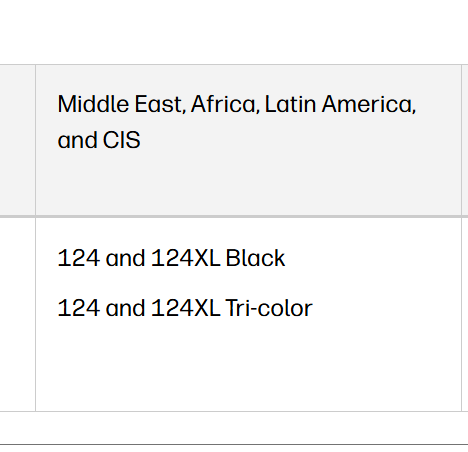
For the HP ENVY 6000 All-in-One series, the compatible cartridges used in Brazil (Latin America region) are different from those used in North America.
I hope this helps.
I'm an HP Employee.
If this reply helped resolve your issue, please select the Accept as Solution as it helps others in the community quickly find the answer they’re looking for.
And if you found this reply helpful, clicking Yes below is a great way to let us know we’re providing the support you need, as it encourages us to keep improving and sharing helpful guidance.
09-13-2026
06:57 AM
- last edited on
09-14-2026
12:11 PM
by
 Nal_NR
HP Recommended
Your response is not helpful. I already have the correct ink jet cartridges installed. What would help would be the reset codes to set my printer region to Brazil. Would someone who works for HP please give me the reset codes in a private message? I will post my HP Smart Reset Panel again, for your convenience. Thank you.
[image]

Be alert for scammers posting fake support phone numbers and/or email addresses on the community.
If you think you have received a fake HP Support message, please report it to us by clicking on "Flag Post".
† The opinions expressed above are the personal opinions of the authors, not of HP. By using this site, you accept the Terms of Use and Rules of Participation.


Didn't find what you were looking for?
Ask the community
† The opinions expressed above are the personal opinions of the authors, not of HP. By using this site, you accept the <a href="https://www8.hp.com/us/en/terms-of-use.html" class="udrlinesmall">Terms of Use</a> and <a href="/t5/custom/page/page-id/hp.rulespage" class="udrlinesmall"> Rules of Participation</a>.