• ×
    Information
    Need Windows 11 help?
    Check documents on compatibility, FAQs, upgrade information and available fixes.
    Windows 11 Support Center.
  • post a message
  • ×
    Information
    Need Windows 11 help?
    Check documents on compatibility, FAQs, upgrade information and available fixes.
    Windows 11 Support Center.
  • post a message
Guidelines

Featured blog article:

Check some of the most frequent questions about Instant Ink: HP INSTANT INK, HP+ PLANS: INK AND TONER.


Check out our Black or Color Ink Not Printing, Other Print Quality Issues info about: Print quality and Cartridge Issues.
HP Recommended
HP Support Assistant Software
Microsoft Windows 10 (64-bit)

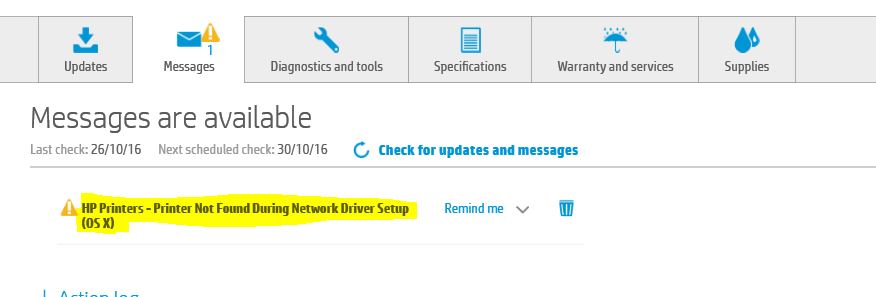
Support Assistant (SA) continues to report I have an error on one of my Inkjet printers (a 3630).

I am running Win10, 64bit and SA continually tells me that the "Printer was not found during Network driver setup (OS X)."

I am not running and have not ever run OS X on any machine in any universe!!!!!

I delete the message and the next time I boot my PC it returns!  It is driving me crazy.

I had real issues setting up the printer and now that I have it (and another printer) all working correctly, I am reluctant to uninstall and re-install.

Why does SA continually display the same message that I delete all the time?  I hate seeing the error message when it isn't relevant.

Can somebody offer a solution that doesn't involve un-installing the 3630 printer?


Capture.JPG

Thanks
Wes

1 ACCEPTED SOLUTION

Accepted Solutions
HP Recommended

Hi@Shelldrake,


Thank you for choosing HP Support Forums. Best platform for all sorts of solutions, tips and tweaks to your questions/issues.


To have the best experience on HP forum, visit our HP Forums Guide to know more.


Error on HP Support assistant. Is that right?


Thank you for sharing the issue details. I would like to help you.


I request you to try the step and check if that helps.

  • Click on the “Down-arrow” next to “Remind me”.
  • Select the option “never remind again” and wait for 10 seconds.
  • Close the app and restart the PC to check if the error comes back.

Hope this helps. Let me know for more.


Happy posting.

Resolv_S

Glad to help you. I work for HP

Please click “Accept as Solution ” if you feel my post solved your issue, it will help others find the solution.
Click the “Kudos Thumbs Up" to say “Thanks” for helping!

Resolv_S
I work on behalf of HP

If you found this post helpful, you can let others know by clicking the “Accept as Solution” button. You can also show your appreciation, with a kudos, by clicking the “Thumbs up" button!

View solution in original post

2 REPLIES 2
HP Recommended

Hi@Shelldrake,


Thank you for choosing HP Support Forums. Best platform for all sorts of solutions, tips and tweaks to your questions/issues.


To have the best experience on HP forum, visit our HP Forums Guide to know more.


Error on HP Support assistant. Is that right?


Thank you for sharing the issue details. I would like to help you.


I request you to try the step and check if that helps.

  • Click on the “Down-arrow” next to “Remind me”.
  • Select the option “never remind again” and wait for 10 seconds.
  • Close the app and restart the PC to check if the error comes back.

Hope this helps. Let me know for more.


Happy posting.

Resolv_S

Glad to help you. I work for HP

Please click “Accept as Solution ” if you feel my post solved your issue, it will help others find the solution.
Click the “Kudos Thumbs Up" to say “Thanks” for helping!

Resolv_S
I work on behalf of HP

If you found this post helpful, you can let others know by clicking the “Accept as Solution” button. You can also show your appreciation, with a kudos, by clicking the “Thumbs up" button!

HP Recommended

Not sure what happened, but when I logged onto my computer this monring the error message was gone.  After 15 delete attempts and 2 months of trying to delete it, it finally dissapeared.


So not sure what you did Resolv_S, but you are good, very good (you fixed my issue remotely without even touching it)!!! 🙂


Anyway, I'm happy and smiling again and the world is a fantastic place.


Cheers

Wes


† The opinions expressed above are the personal opinions of the authors, not of HP. By using this site, you accept the <a href="https://www8.hp.com/us/en/terms-of-use.html" class="udrlinesmall">Terms of Use</a> and <a href="/t5/custom/page/page-id/hp.rulespage" class="udrlinesmall"> Rules of Participation</a>.
-->