Here is the solution for Blue screen error 83C0000B on HP OfficeJet Pro 8010e, 9020e Printer Series: Click here to view.
Create an account on the HP Community to personalize your profile and ask a question
Your account also allows you to connect with HP support faster, access a personal dashboard to manage all of your devices in one place, view warranty information, case status and more.
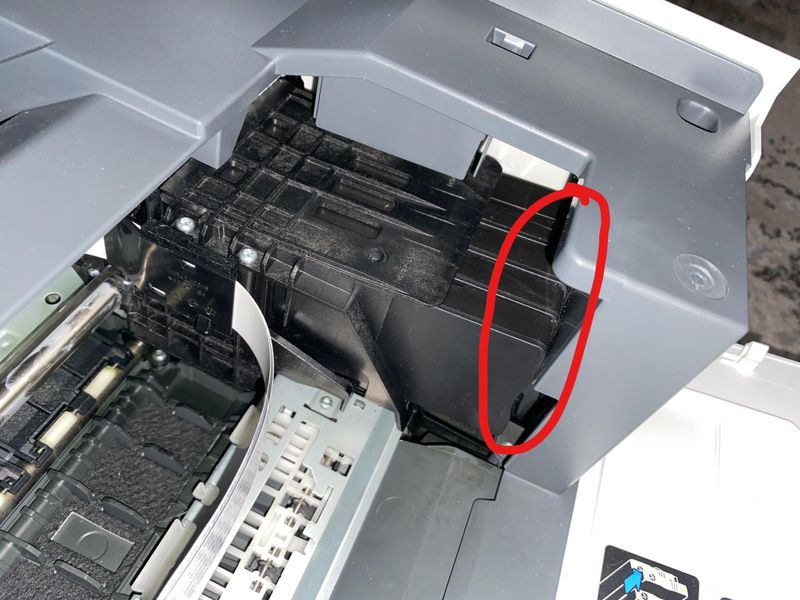
I tried to print something and got a "carriage jam" error. I open the top and see the carriage is stuck on the right-hand side of the printer. I tried unplugging the machine and restarting and get the same message. Every time I hit "Ok" the carriage moves very slightly to the right but then returns back to where it was and won't move anywhere else. I open both the front paper loading tray and the back one and there is no paper jam visible. There is no obstruction on the inside of the machine. Then I notice that one of the ink cartridges is not aligned with the other ones--it has popped out of place. I tried to push it back in but it won't stay in place. There is no way I can pull it out because the cartridge is blocked by the right-hand side of the printer. I tried to push the cartridge so it's farther in as I hit the "Ok" button but the carriage does the exact same thing as before. I tried pushing in the other ink cartridges but then they all stuck out and won't go back in. I don't know how to remove the cartridges when the carriage is all the way to the right. Video can be viewed at: https://www.amazon.com/photos/shared/FTXo4EytQMic7SWTfdcMJQ.JiPA7i4ldHlsUVurWzDLxt